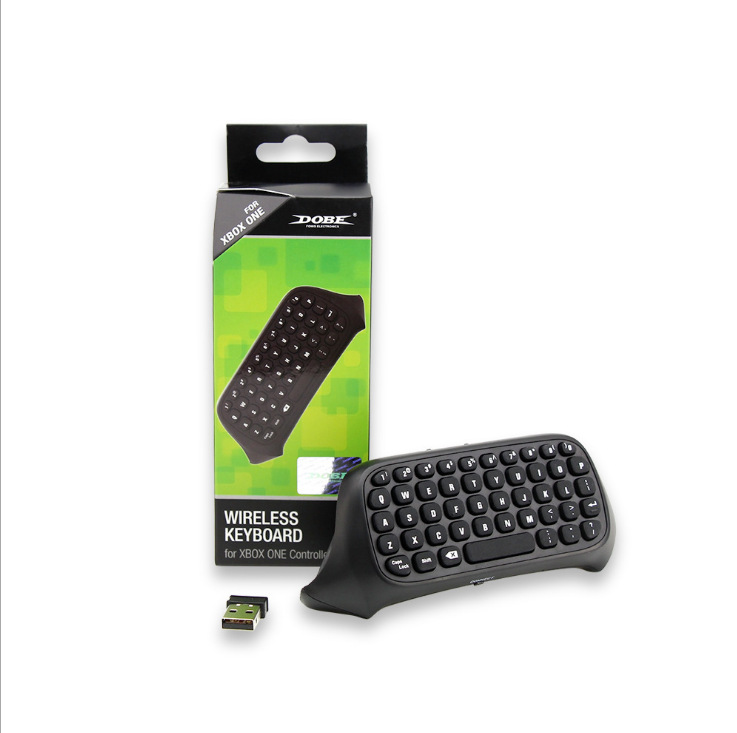
ONE Handle Keyboard 2.4G Keyboard Wireless Keyboard Xboxone Chat

£26.99

1

Details

Instructions for use:
1. Connect the XBOX one host power supply first, then connect the HDMI cable to the display device and turn on the XBOX one host power supply. The corresponding power indicator lights up.
2. Connect the Xbox_one handle to the XBOX one host (do not understand the manual)
3. Align the two connecting posts of the keyboard with the holes of the controller, align the XBOX ONE headphone head with the seat on the back of the wireless controller, and then gently push the keyboard to the controller until it is stuck. .
4. When the controller of the controller is connected, press the code button on the back of the XBOX one keyboard. The blue light of the XBOX one keyboard will be bright. At this point, the 2.4G receiver of the distribution is plugged into any USB port of the XBOX one host, and the XBOX one keyboard can be automatically completed.
5. After the code is completed, the XBOX one blue code light will be off, which means that the XBOX one keyboard can work normally. (If there is no code success, the blue pair of lights will turn off automatically for 12 seconds, indicating that the XBOX one keyboard enters the sleep power saving mode)
6. The XBOX one keyboard and the 2.4G receiver only need to be coded once, and the subsequent use only needs to open the host wake-up handle to be automatically connected and used directly.

7, XBOX one handle sleep, this product will also go to sleep. Press the “” button on the XBOX one handle to wake up the handle and keyboard.


Product information

Opening Hours

Mon - Fri 9:00am - 5:00pm

Sat - 9:00am - 2pm

Delivery & Returns

Orders placed before 2pm will be despatched the same day.

When we detach your order we will send you an email with a tracking code

Product information
  • Instructions for use:
  • 1. Connect the XBOX one host power supply first, then connect the HDMI cable to the display device and turn on the XBOX one host power supply. The corresponding power indicator lights up.
  • 2. Connect the Xbox_one handle to the XBOX one host (do not understand the manual)
  • 3. Align the two connecting posts of the keyboard with the holes of the controller, align the XBOX ONE headphone head with the seat on the back of the wireless controller, and then gently push the keyboard to the controller until it is stuck. .
  • 4. When the controller of the controller is connected, press the code button on the back of the XBOX one keyboard. The blue light of the XBOX one keyboard will be bright. At this point, the 2.4G receiver of the distribution is plugged into any USB port of the XBOX one host, and the XBOX one keyboard can be automatically completed.
  • 5. After the code is completed, the XBOX one blue code light will be off, which means that the XBOX one keyboard can work normally. (If there is no code success, the blue pair of lights will turn off automatically for 12 seconds, indicating that the XBOX one keyboard enters the sleep power saving mode)
  • 6. The XBOX one keyboard and the 2.4G receiver only need to be coded once, and the subsequent use only needs to open the host wake-up handle to be automatically connected and used directly.
  • 7, XBOX one handle sleep, this product will also go to sleep. Press the “” button on the XBOX one handle to wake up the handle and keyboard.
  • Weight: 108 g
Delivery & returns

Your one handle keyboard 2.4g keyboard wireless keyboard xboxone chat is sent direct from our supplier and usually arrives in 4-7 working days, so it may come separately from anything else you order.

Free UK delivery on orders over £25; otherwise £2.99. Changed your mind? Return it unused and in its packaging within 30 days. Faulty within 12 months? We'll replace it.

Got a question about the ONE Handle Keyboard 2.4G Keyboard Wireless Keyboard Xboxone Chat?

Ask us anything about the ONE Handle Keyboard 2.4G Keyboard Wireless Keyboard Xboxone Chat (product code CJ-CJXFZNKC00061-black) — sizes, what it works with, delivery — and we'll reply by email.

Reviews

No reviews yet — be the first.
Reviews of ONE Handle Keyboard 2.4G Keyboard Wireless Keyboard Xboxone Chat

Write a review